Your email open rate is not a reflection of your email content. It is a reflection of your subject line. The best-written email in your outbox goes unread if the subject line does not earn the click. Across all industries, the average email open rate sits around 21%. The best campaigns consistently hit 45–60%. The difference is almost entirely in the subject line — and in this guide, you will learn exactly how to close that gap.
Download the Free Ebook
100 Email Subject Line Templates That Increase Open Rates (2026)
Get all 100 professionally written subject line templates in one beautifully designed PDF. Covers every email type: sales, marketing, newsletters, cold outreach, welcome, follow-up, ecommerce and re-engagement. Includes formulas, power words, cheatsheets and an AI prompt library.
- 100 copy-and-paste templates
- 12 subject line formulas
- Power word cheatsheet
- A/B testing guide
- Open rate benchmarks by industry
- AI prompt library
- Printable A4 PDF
- Offline access
- Free forever
- No signup required
Why subject lines determine everything
When someone sees your email in their inbox, they make a decision in less than three seconds. They see the sender name, the subject line, and the first 40-90 characters of preview text. Nothing else. The subject line has one job: earn the open. Not explain the email, not summarise the content, not impress anyone with creativity. Just earn the open.
Research consistently shows that 47% of email recipients decide whether to open based on the subject line alone. A 10% improvement in open rate doubles the reach of every campaign you send without increasing your list size, budget, or send frequency.
The anatomy of a high-converting subject line
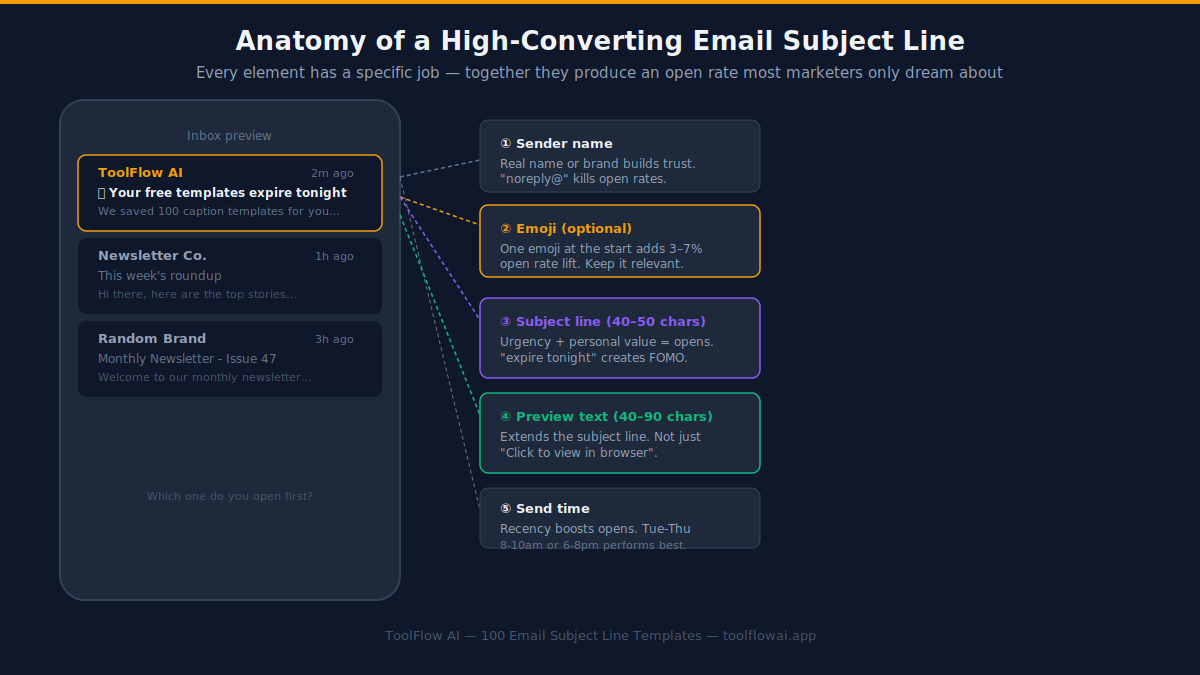
① Sender name — the most underrated open rate lever
Before anyone reads your subject line, they read your sender name. "Sarah from ToolFlow" consistently outperforms "ToolFlow AI" in open rate tests. A real name signals a real person, not a broadcast. Never send from "noreply@" — it tells recipients their reply does not matter, which means neither does your email.
② Emoji — one is plenty, none is fine
A single relevant emoji at the start of a subject line adds visual contrast in the inbox and typically lifts open rates by 3–7%. The key word is relevant — a 🔥 for urgency, a 🎁 for a free resource, a 📊 for a report. Using emojis randomly or excessively reads as spam. Zero emojis is perfectly fine; one is a tool, several is noise.
③ The subject line itself — 40 to 50 characters is the sweet spot
Most email clients display 40–50 characters on desktop and 30–40 on mobile before truncating. Write for mobile first. Put the most compelling word or phrase at the start. If your subject line reads as interesting even when cut off at word five, it is working.
④ Preview text — the overlooked second subject line
Preview text is the 40–90 characters of body text visible after the subject line in most inbox views. Treat it as a second subject line, not as an afterthought. "View in browser" or an image placeholder appearing here is a waste of significant inbox real estate. Use it to extend the subject line, add a secondary hook, or create a call to action before the email is even opened.
⑤ Send time — recency affects open rates more than most people think
Emails sent on Tuesday, Wednesday, and Thursday between 8–10am and 6–8pm in the recipient's local timezone consistently outperform other windows across most industries. The recency indicator ("2 minutes ago" vs "3 days ago") in the inbox significantly affects whether someone opens. Emails sent when the recipient is actively checking their inbox get opened; emails that sit for 48 hours rarely recover.
Good subject lines vs bad subject lines
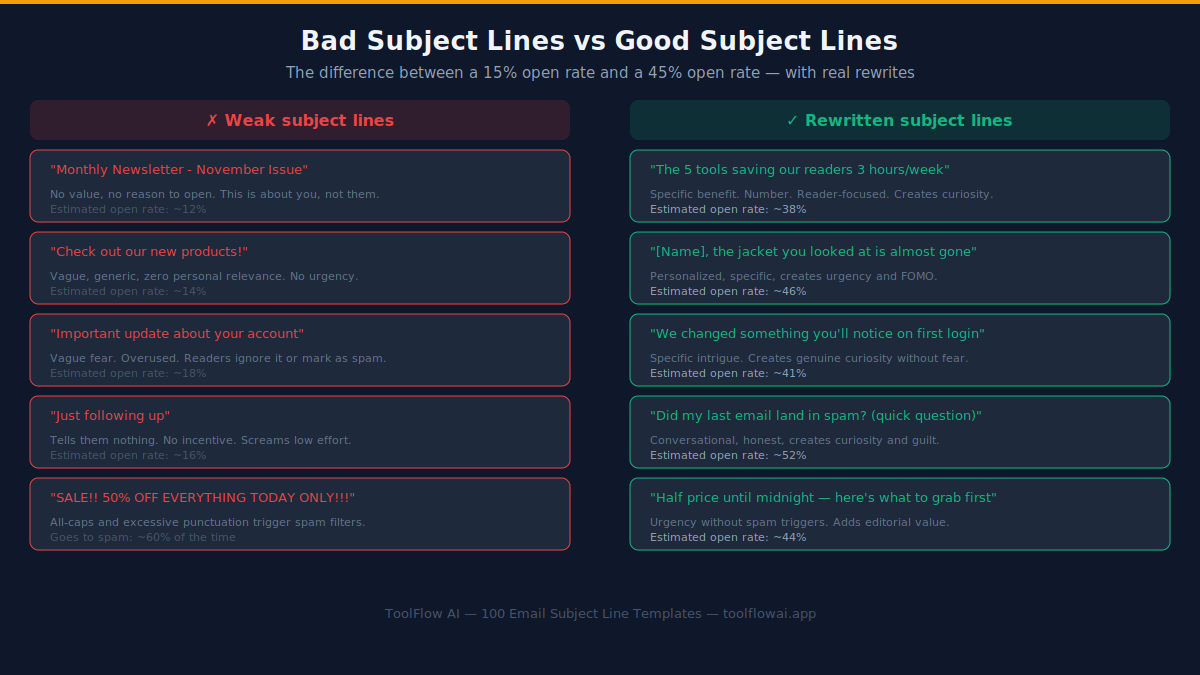
The pattern across every bad subject line is the same: it is about the sender, not the reader. It communicates nothing specific, creates no curiosity, and gives no reason to open now rather than later (or never).
| ❌ Weak pattern | Why it fails | ✅ Fix |
|---|---|---|
| Newsletter — Issue 47 | About sender, not reader | Lead with the most useful thing inside |
| Check out our new products! | Vague, no personal relevance | Name the specific product and why they care |
| Important update | Used by every spam email ever | Say what the update actually is |
| Just following up | Gives no reason to open | Add a hook: "Did my last email land in spam?" |
| SALE!! 50% OFF EVERYTHING!!! | Spam trigger: all-caps + punctuation | Same offer, no caps: "Half price until midnight" |
12 subject line formulas that consistently work
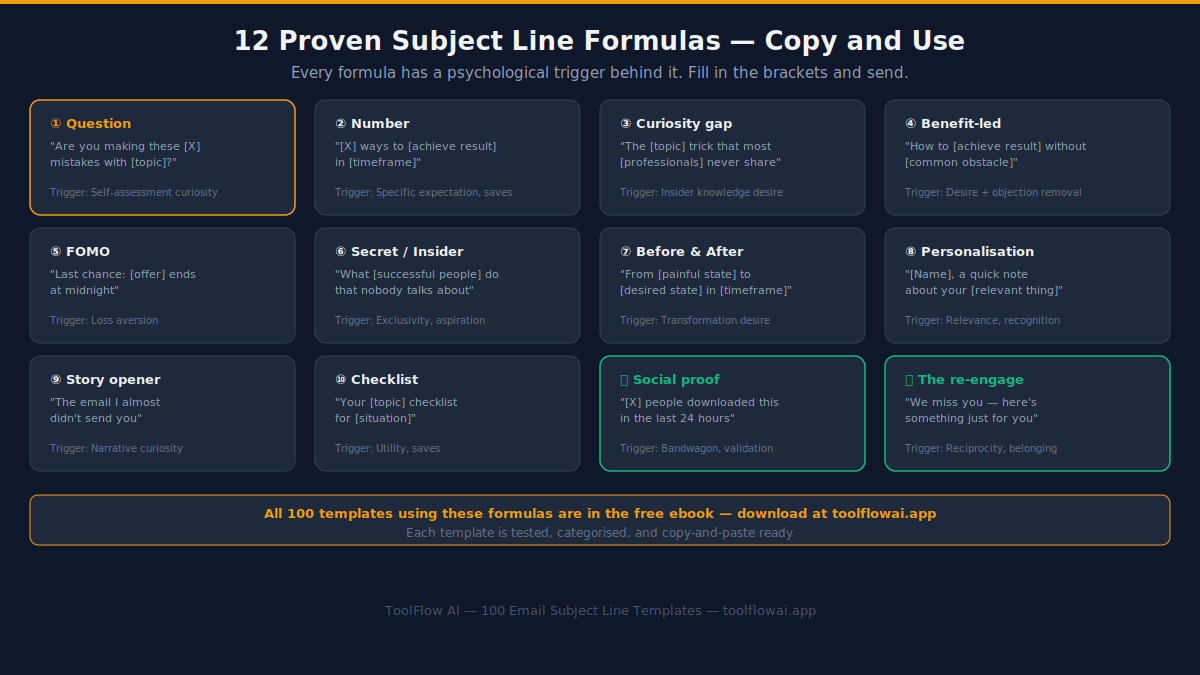
These formulas are not magic words — they are psychological patterns that tap into how human attention works. Use them as starting points, not templates to copy verbatim. Replace the brackets with your own specific content.
① The Question
Formula: "Are you making these [X] mistakes with [topic]?"
Why it works: Self-assessment curiosity. The reader cannot answer without opening.
Best for: Education, newsletters, onboarding sequences.
② The Number
Formula: "[X] ways to [achieve result] in [timeframe]"
Why it works: Sets specific expectations. Readers know exactly what they are getting. Number-led subject lines have significantly higher save rates because they signal utility.
Best for: Content newsletters, educational emails, product updates.
③ The Curiosity Gap
Formula: "The [topic] trick most [professionals] never share"
Why it works: Creates an information gap the reader can only close by opening. The word "never" adds an insider exclusivity signal.
Best for: B2B, SaaS, content marketing.
④ The Benefit-Led
Formula: "How to [achieve result] without [common obstacle]"
Why it works: Combines desire with pre-emptive objection removal. The "without [obstacle]" removes the reader's excuse for not engaging.
Best for: Sales emails, product launches, webinar invites.
⑤ FOMO / Urgency
Formula: "Last chance: [offer] ends at midnight"
Why it works: Loss aversion is one of the most powerful human motivators. Only use this when it is genuinely true — false urgency destroys trust over time.
Best for: Ecommerce, promotions, event registrations.
⑥ The Secret / Insider
Formula: "What [successful people] do that nobody talks about"
Why it works: Exclusivity and aspiration. Humans are wired to want insider information.
Best for: B2B, coaching, high-value newsletters.
⑦ Before and After
Formula: "From [painful state] to [desired state] in [timeframe]"
Why it works: Transformation stories are universally compelling. The reader projects themselves into the journey.
Best for: Case studies, testimonial emails, product launch sequences.
⑧ Personalisation
Formula: "[Name], a quick note about your [relevant thing]"
Why it works: Personalisation increases open rates by an average of 26% according to Campaign Monitor data. The name signals this is not a broadcast — it is a message for them specifically.
Best for: Triggered emails, onboarding, winback campaigns.
⑨ The Story Opener
Formula: "The email I almost didn't send you"
Why it works: Creates narrative tension before the email is even opened. The reader immediately wants to know why.
Best for: Founder emails, personal brands, re-engagement.
⑩ The Checklist
Formula: "Your [topic] checklist for [situation]"
Why it works: Utility framing. The reader knows exactly what they are getting and it is immediately useful. Checklist emails have some of the highest save rates of any format.
Best for: Newsletters, onboarding sequences, seasonal campaigns.
⑪ Social Proof
Formula: "[X] people [did this] in the last [timeframe]"
Why it works: Bandwagon psychology combined with recency. If many people are doing something, the reader wants to know what it is.
Best for: Product launches, community emails, viral content promotion.
⑫ The Re-engagement
Formula: "We miss you — here's something just for you"
Why it works: Activates reciprocity (they did something for you) and belonging (you were missed). Works well for cold subscribers who have not opened in 30+ days.
Best for: Win-back campaigns, re-engagement sequences.
30 copy-and-paste subject line examples
These are ready to use — replace the items in [brackets] with your own content. The full collection of 100 professionally written templates is in the free ebook below, covering every email type including sales, marketing, newsletters, cold outreach, welcome series, follow-up, ecommerce, abandoned cart, product launches, and holiday campaigns.
Sales and cold outreach (6 examples)
- "Quick question about [company's] approach to [specific challenge]"
- "How [similar company] reduced [metric] by [X]% in 90 days"
- "[Name] — does [pain point] keep you up at night?"
- "Saw your post about [topic] — had to reach out"
- "Did my last email land in spam? (serious question)"
- "[Mutual connection] said I should talk to you"
Marketing and promotions (6 examples)
- "[X]% off — but only if you open this before midnight"
- "The [product] that sold out 3 times is back (finally)"
- "We made something you have been asking for"
- "Introducing [product]: [one-line benefit]"
- "[X] people bought this in the last 24 hours"
- "Your cart is getting lonely 😢"
Newsletters and content (6 examples)
- "[X] things I learned that changed how I think about [topic]"
- "The [topic] guide I wish I had when I was starting out"
- "This week: [compelling thing 1], [compelling thing 2], and [compelling thing 3]"
- "The tool every [professional type] is switching to in 2026"
- "I read 47 [topic] articles so you don't have to"
- "What nobody tells you about [topic]"
Welcome and onboarding (6 examples)
- "You're in — here's what happens next"
- "Welcome to [brand] — your first step is this"
- "[Name], before you do anything else — read this"
- "3 things to do in your first 10 minutes with [product]"
- "Your account is ready. Here's how to get the most from it."
- "The one [product] feature most people never discover"
Follow-up sequences (6 examples)
- "Following up — did [previous email topic] help?"
- "You opened my last email but didn't reply — totally fine if now isn't right"
- "One more thing I forgot to mention"
- "[Name], I'll keep this brief"
- "Last email from me on this — I promise"
- "Quick update on [topic we discussed]"
Open rate benchmarks by email type
| Email type | Industry avg open rate | Top performers | Best formula |
|---|---|---|---|
| Welcome emails | 50–60% | 70–80% | Personalisation + Next step |
| Transactional emails | 45–55% | 65%+ | Clarity + Order details |
| Newsletters | 21–28% | 40–50% | Number + Curiosity gap |
| Promotional emails | 17–25% | 35–45% | FOMO + Specificity |
| Cold outreach | 15–25% | 40–60% | Personalisation + Question |
| Abandoned cart | 35–45% | 55–65% | FOMO + Personal |
| Re-engagement | 12–18% | 25–35% | Story + Reciprocity |
Subject line character counts — the data
| Length | Characters | Mobile display | Best for |
|---|---|---|---|
| Very short | Under 20 | ✓ Full display | Re-engagement, mystery, personal emails |
| Optimal | 30–50 | ✓ Full display | All email types — highest average open rate |
| Medium | 50–70 | Partial truncation | Benefit-led, checklist, story openers |
| Long | 70+ | Heavy truncation | Avoid — most of the subject line is invisible |
20 common subject line mistakes — and how to fix them
- Starting with "Newsletter" — tells the reader it is a broadcast, not a message. Fix: lead with the most interesting thing inside it.
- Using all capitals — SCREAMS SPAM and triggers filters. Fix: sentence case or title case only.
- Too many exclamation marks — one is occasionally fine, two or more signals desperation. Fix: create urgency through specificity, not punctuation.
- Including spam trigger words — "free" (in subject lines only), "guaranteed", "no obligation", "winner" and similar phrases reduce deliverability. Fix: use synonyms or restructure the sentence.
- Writing the subject line last — means it gets the least creative attention. Fix: write the subject line first, before the email body.
- "Just following up" — the most common and least effective follow-up subject line ever. Fix: add a hook, a piece of value, or a disarming observation.
- Clickbait that doesn't deliver — misleading subject lines produce opens but destroy trust and increase unsubscribes. Fix: the email must deliver exactly what the subject line promises.
- No personalisation on automated emails — triggered emails without a first name feel like broadcasts even when they are not. Fix: add {{first_name}} as a minimum in the subject or preview text.
- Ignoring preview text — defaulting to "View email in browser" wastes a second hook. Fix: write a preview text that extends the subject line.
- Generic urgency — "Act now!" means nothing. Fix: specific urgency: "Offer ends at 11:59pm tonight".
- Writing for desktop only — over 60% of emails are opened on mobile. Fix: keep subject lines under 40 characters, or at least front-load the most interesting part.
- Burying the benefit — putting the interesting thing at the end of a long subject line means it is cut off. Fix: put the most compelling word in the first five words.
- Never A/B testing — most email platforms offer split testing as a basic feature. Fix: test one variable at a time (emoji vs no emoji, question vs statement) and track opens over 48 hours.
- Sending at the wrong time — an email sent at 3am local time is buried by the time the recipient checks their inbox. Fix: schedule for 8-10am or 6-8pm in the recipient's timezone.
- Re-using identical subject lines — repeating the same subject line format for every email trains readers to ignore it. Fix: rotate between question, number, curiosity gap, and benefit formulas.
- Being too clever — obscure references and elaborate wordplay may be impressive but produce lower open rates than clear, specific value. Fix: read your subject line to someone unfamiliar with your brand. If they do not understand it immediately, rewrite it.
- Asking for too much before the open — a subject line that tries to explain everything leaves nothing to discover inside. Fix: the subject line is a teaser, not a summary.
- Sending from a "noreply" address — signals you are not open to conversation and reduces trust. Fix: use a real address, even if it forwards to a shared inbox.
- Not cleaning your list — low open rates from disengaged subscribers tell email providers your content is not wanted, which damages deliverability for your whole list. Fix: segment out and re-engage or remove subscribers who have not opened in 90 days.
- Optimising the subject line in isolation — a great subject line that leads to an irrelevant or disappointing email produces high opens and low clicks. Fix: the subject line, preview text, and email body need to form a coherent promise-and-delivery sequence.
25 practical email subject line tips
- Write 10 subject lines for every email, then pick the best one. Your first draft is rarely your best. The tenth usually is.
- Front-load the most important word. Mobile clients cut off at 30–40 characters. The word that earns the open needs to appear in the first five words.
- Use the word "you" more than "we". Subject lines written from the reader's perspective consistently outperform brand-centric ones.
- Test emoji vs no emoji as your first A/B test. It is the easiest variable to isolate and typically produces a clear winner quickly.
- Never use "FREE" in all-caps in a subject line. Even if your offer is free, the word triggers spam filters. Write "free" lowercase or use "complimentary" or "on us".
- Ask a question that the reader cannot answer without opening. "Are you doing this?" only works if "this" is something they care about. Be specific.
- Use odd numbers. "7 tips" outperforms "10 tips" in most subject line tests. Odd numbers feel less rounded-up and more specific.
- Create a subject line swipe file. Save every subject line that made you open an email you weren't expecting to. Review it before every campaign.
- Match the subject line tone to your audience's language. B2B SaaS buyers respond differently from Etsy shoppers. Use the vocabulary your audience uses, not the vocabulary you prefer.
- Preview text starts with the first visible text in your email body. If your template starts with an image, the preview text will be empty or show "image". Add a hidden pre-header text element at the very top of your HTML.
- Re-send to non-openers with a different subject line. After 48 hours, resend to everyone who did not open with a completely different subject line. This typically recovers 10-25% of your total opens.
- Use parentheses for tone. "(just checking)" or "(quick question)" at the end of a subject line adds informality and humanises automated emails.
- Mention a specific person or company in cold outreach. "[Name] — I noticed [Company] just [did something specific]" shows genuine research and dramatically improves cold open rates.
- Test short vs long in your next A/B test. "You're losing money on this" (30 chars) vs "The three pricing mistakes that cost most businesses 20% of their revenue" (73 chars). You may be surprised which wins.
- Time-stamp your subject lines where relevant. "This expires at midnight" is more compelling than "This expires soon". Specific times create real urgency.
- Use the AI Email Writer for first drafts. The ToolFlow AI Email Writer generates complete emails with subject line options in seconds. Use it as a starting point, then apply these principles to refine the subject line.
- Segment your list and write subject lines for each segment. A subject line that resonates with a new subscriber is completely different from one that resonates with a three-year customer.
- Read your subject line in your own inbox. Before sending, send yourself a test and look at it in your actual inbox. You will notice things you did not see in the draft editor.
- Track open rate by subject line formula over time. After 20+ campaigns, you will have data showing which formula consistently performs best for your audience. Lean into it.
- Do not optimise for opens alone. A misleading subject line produces a high open rate and a low click rate. Track both together and optimise the ratio, not just the open count.
- Use line breaks strategically in preview text. Some email clients show preview text as a second line. Write it as a second sentence that adds a reason to open, not a repetition of the subject line.
- Avoid question-only subject lines for cold outreach. "Got a minute?" sounds intrusive. Questions work best when they reference something specific about the recipient's situation.
- Use "Re:" strategically but carefully. "Re: your question about [topic]" dramatically increases cold email open rates — but only if the context makes the "Re:" plausible. Using it when there was no prior conversation erodes trust permanently.
- Check your subject line in a spam score tool before every important campaign. Tools like Mail-Tester and GlockApps show you which words trigger filters before the email is sent.
- The best subject line sounds like it came from a friend, not a brand. Read it aloud. If it sounds like a press release, rewrite it until it sounds like a text message.
How to write subject lines for every email type
Sales emails
Personalisation is the single biggest lever in sales subject lines. Using the prospect's name, company, or a reference to something specific about them (a recent post, an award, a product launch) dramatically outperforms generic approaches. The most effective cold email subject lines are short (under 40 characters), conversational, and create a specific reason for the prospect to be curious — not a reason to be sold to.
Ecommerce and promotional emails
Specificity over vagueness. "50% off everything" is less effective than "Your basket is 50% cheaper until midnight". Abandoned cart emails perform best when they combine personalisation (the specific product) with soft urgency (stock, time limit) and social proof (others are looking at this). The ToolFlow AI Email Writer generates ecommerce email subject lines matched to specific product types and urgency levels.
Newsletters
The most successful newsletter subject lines preview the most interesting thing inside, not the format. "Issue 47" tells readers nothing. "The startup hack that cut our support tickets by 60%" tells readers exactly what they will get and who it is relevant to. Curiosity gap formulas and number-led subject lines consistently outperform descriptive ones for newsletters.
Welcome emails
Welcome emails have the highest open rates of any email type because the subscriber just signed up — they are at peak interest. Do not waste this with a generic "Welcome to [Brand]" subject line. Use it to deliver immediate value, set expectations, or create excitement about what is coming next.
Follow-up emails
Follow-up subject lines fail when they sound like an obligation ("Just following up") rather than an offer ("One more thing I forgot to mention"). The most effective follow-up subject lines add something new — a piece of value, a question, a resource — rather than just reminding the recipient that they haven't replied.
Ready to write better emails?
Generate high-converting subject lines, complete emails, follow-ups, newsletters, and campaigns in seconds.
Frequently Asked Questions
What is the ideal length for an email subject line?
30–50 characters is the sweet spot for most email clients and most device types. This is long enough to communicate a specific value or hook, and short enough to display fully on mobile screens. The most important principle is front-loading: put the most compelling word or phrase in the first five words so it is visible even when truncated.
Do emojis in subject lines improve open rates?
One relevant emoji at the start of a subject line typically improves open rates by 3–7% because it adds visual contrast in the inbox. Using multiple emojis or irrelevant ones has no positive effect and can trigger spam filters. Zero emojis is perfectly fine — an emoji is a tool, not a requirement.
What words should I avoid in email subject lines?
Avoid all-caps words, excessive exclamation marks, and common spam trigger phrases: "free" in caps, "guaranteed", "no obligation", "you've been selected", "winner", "cash", "make money", and similar terms. These trigger spam filters and reduce deliverability. Use lowercase "free" and specific alternatives where needed.
How do I improve my email open rate?
Four levers have the biggest impact: (1) A compelling, specific subject line using one of the 12 formulas above. (2) A relevant sender name — a real person's name outperforms a brand name alone. (3) Preview text that extends and adds to the subject line. (4) Sending at the right time — Tuesday to Thursday, 8–10am or 6–8pm in your audience's timezone. The full improvement process is covered in the free ebook.
What is A/B testing for email subject lines?
A/B testing means sending two versions of the same email with different subject lines to a small portion of your list, waiting 2–4 hours, then sending the winner to the remainder. Most email platforms (Mailchimp, Klaviyo, ConvertKit, HubSpot) include this as a built-in feature. Test one variable at a time: emoji vs no emoji, question vs statement, short vs long. Track open rates over 48 hours for statistical significance.
How does personalisation affect open rates?
Including the recipient's first name in a subject line increases open rates by an average of 26% according to Campaign Monitor research. More powerful than name personalisation is situational personalisation — referencing something specific to the recipient (their recent purchase, their company, a specific problem they mentioned). Merge tags like {{first_name}} are supported by every major email platform.
What is preview text and how should I use it?
Preview text is the 40–90 characters of text that appear after the subject line in most inbox views. It defaults to the first visible text in your email body — which is often "View in browser" or image alt text if not explicitly set. Write a pre-header text element at the very top of your email HTML that acts as a second subject line: extend the hook, add a secondary benefit, or include a call to action.
Can I use the same subject line template for different industries?
The formulas (question, number, curiosity gap, FOMO, etc.) work across all industries. The specific language, tone, and references need to be adapted to each audience. A subject line that works for a SaaS product will need to be rewritten for an ecommerce brand — same formula, different vocabulary, different urgency signals.
How often should I A/B test my subject lines?
Test on every campaign where you have a list large enough to produce statistically meaningful results (generally 1,000+ subscribers). Even with smaller lists, the discipline of writing multiple versions and choosing intentionally is more valuable than never testing. After 20+ campaigns, you will have genuine data about what works for your specific audience.
What is the best subject line for cold emails?
The best cold email subject lines are short (under 40 characters), personalised to the specific recipient, and create specific rather than generic curiosity. "[Name], quick question about [Company]" or "Noticed [Company] just [specific observation]" consistently outperforms generic approaches. Avoid anything that sounds like a broadcast — cold email open rates depend entirely on the impression of individual, personal contact.
Should I capitalise every word in my subject line?
Title case (Capitalising Every Word) is appropriate for newsletters and formal email types. Sentence case (Only the first word capitalised) performs better for personal emails, follow-ups, and cold outreach — it reads more like a message from a person than a marketing blast. All caps should be avoided entirely as a spam signal.
Download the Free Ebook
100 Email Subject Line Templates That Increase Open Rates (2026)
100 copy-and-paste subject line templates across every email type — offline, printable, and free forever.
Free · No signup · Instant download